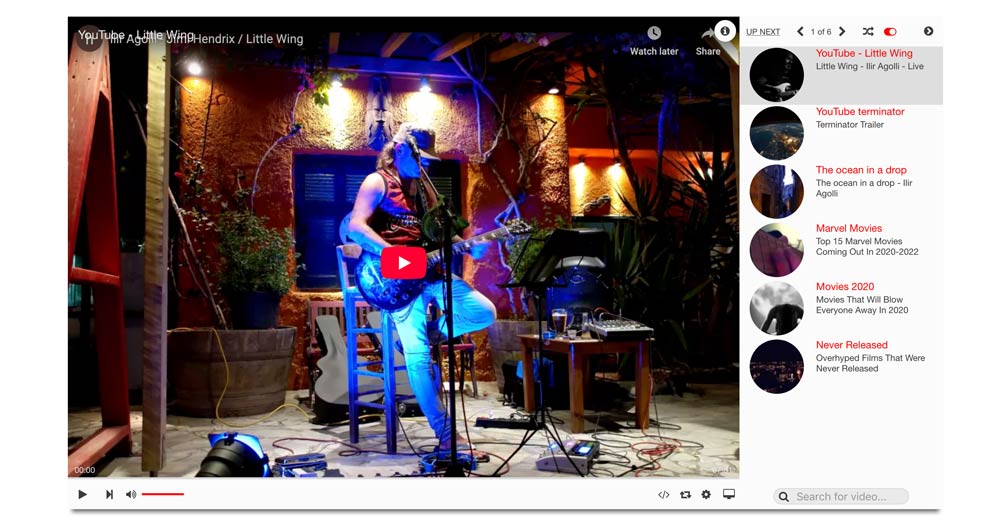
Media Player Joomla module for custom videos, YouTube channels, YouTube playlists, Vimeo, HTML5 video, and image playlist items.
General Settings
| Setting | Purpose |
|---|---|
| Player Layout | Fit the player to its container, use fixed dimensions, or fill the browser. |
| Fixed Size Width / Height | Dimensions used by fixed-size mode. |
| Video Ratio | Aspect ratio such as 16/9 or 4/3. |
| Poster image | Image shown before playback. |
| Media Player Theme | Dark or light player controls. |
| Playlist type | Shows the playlist on the right or at the bottom. |
| Playlist behaviour | Opens or closes the playlist when the page loads. |
| Light Box | Opens playback in a popup overlay. |
| Info, Embed, Search | Enables the corresponding player controls. |
| YouTube Related Videos | Controls related videos after YouTube playback. |
Video Sources
Custom videos
Select Custom videos and add items in the repeatable Video(s) field.
- HTML5: enter an MP4 URL.
- youtube: enter the YouTube video ID.
- vimeo: enter the Vimeo video ID.
- image: display an image item.
Each item can also have a title, description, thumbnail, cover image, information text, and optional link.
For https://www.youtube.com/watch?v=abc123XYZ, enter:
abc123XYZYouTube channel
Select YouTube channel and enter the channel ID. The module requests:
https://www.youtube.com/feeds/videos.xml?channel_id=CHANNEL_IDThe Joomla server reads the public RSS feed and converts its entries into normal YouTube playlist items. The initial list does not require a YouTube Data API key.
YouTube playlist
Select YouTube playlist and enter the value after list= in the playlist URL.
https://www.youtube.com/playlist?list=PL123456789
Playlist ID: PL123456789
The module requests:
https://www.youtube.com/feeds/videos.xml?playlist_id=PLAYLIST_ID